Memory ballooning allows you to have your guest dynamically change it’s memory usage by evicting unused memory during runtime. This is a useful feature because it reduces the impact your guest can have on memory usage of your host by giving up unused memory back to the host.


change and update date & time, time zone in ubuntu
tzselect: It is a command to change time zone in ubuntu. Just run the command, select continent or ocean, and
country . Type tzselect and press enter...
#tzselect
Run below command to syncronize time with ntp server
#ntpdate ntp.ubuntu.com
country . Type tzselect and press enter...
#tzselect
Run below command to syncronize time with ntp server
#ntpdate ntp.ubuntu.com
What is cloud computing
Cloud computing is a general term for anything that involves delivering hosted services over the Internet. These services are broadly divided into some categories: Infrastructure-as-a-Service (IaaS), Platform-as-a-Service (PaaS) and Software-as-a-Service (SaaS) and Hardware as a Service (HaaS). The name cloud computing was inspired by the cloud symbol that's often used to represent the Internet in flowcharts and diagrams.
A cloud service has distinct characteristics that differentiate it from traditional hosting. It is sold on demand, typically by the minute or the hour; it is elastic -- a user can have as much or as little of a service as they want at any given time; and the service is fully managed by the provider (the consumer needs nothing but a personal computer and Internet access). Significant innovations in virtualization and distributed computing, as well as improved access to high-speed Internet and a weak economy, have accelerated interest in cloud computing.
A cloud can be private or public. A public cloud sells services to anyone on the Internet. (Currently, Amazon Web Services is the largest public cloud provider.) A private cloud is a proprietary network or a data center that supplies hosted services to a limited number of people. When a service provider uses public cloud resources to create their private cloud, the result is called a virtual private cloud. Private or public, the goal of cloud computing is to provide easy, scalable access to computing resources and IT services.
Hardware as a Service (HaaS) is a service provision model for hardware that is defined differently in managed services and grid computing contexts. In managed services, HaaS is similar to licensing. In grid computing, HaaS is a pay as you use model.
Infrastructure-as-a-Service(IaaS) like Amazon Web Services provides virtual server instanceAPI) to start, stop, access and configure their virtual servers and storage. In the enterprise, cloud computing allows a company to pay for only as much capacity as is needed, and bring more online as soon as required
Platform-as-a-service(PaaS) in the cloud is defined as a set of software and product development tools hosted on the provider's infrastructure. Developers create applications on the provider's platform over the Internet. PaaS providers may use APIs, website portals or gateway software installed on the customer's computer. Force.com, (an outgrowth of Salesforce.com) and GoogleApps are examples of PaaS.
software-as-a-service(SaaS) in this cloud model, the vendor supplies the hardware infrastructure, the software product and interacts with the user through a front-end portal. Services can be anything from Web-based email to inventory control and database processing. Because the service provider hosts both the application and the data, the end user is free to use the service from anywhere.
A cloud service has distinct characteristics that differentiate it from traditional hosting. It is sold on demand, typically by the minute or the hour; it is elastic -- a user can have as much or as little of a service as they want at any given time; and the service is fully managed by the provider (the consumer needs nothing but a personal computer and Internet access). Significant innovations in virtualization and distributed computing, as well as improved access to high-speed Internet and a weak economy, have accelerated interest in cloud computing.
A cloud can be private or public. A public cloud sells services to anyone on the Internet. (Currently, Amazon Web Services is the largest public cloud provider.) A private cloud is a proprietary network or a data center that supplies hosted services to a limited number of people. When a service provider uses public cloud resources to create their private cloud, the result is called a virtual private cloud. Private or public, the goal of cloud computing is to provide easy, scalable access to computing resources and IT services.
Hardware as a Service (HaaS) is a service provision model for hardware that is defined differently in managed services and grid computing contexts. In managed services, HaaS is similar to licensing. In grid computing, HaaS is a pay as you use model.
Infrastructure-as-a-Service(IaaS) like Amazon Web Services provides virtual server instanceAPI) to start, stop, access and configure their virtual servers and storage. In the enterprise, cloud computing allows a company to pay for only as much capacity as is needed, and bring more online as soon as required
Platform-as-a-service(PaaS) in the cloud is defined as a set of software and product development tools hosted on the provider's infrastructure. Developers create applications on the provider's platform over the Internet. PaaS providers may use APIs, website portals or gateway software installed on the customer's computer. Force.com, (an outgrowth of Salesforce.com) and GoogleApps are examples of PaaS.
software-as-a-service(SaaS) in this cloud model, the vendor supplies the hardware infrastructure, the software product and interacts with the user through a front-end portal. Services can be anything from Web-based email to inventory control and database processing. Because the service provider hosts both the application and the data, the end user is free to use the service from anywhere.
What is Hypervisor
A hypervisor, also called a virtual machine manager, is a program that allows multiple operating systems to share a single hardware host. Each operating system appears to have the host's processor, memory, and other resources all to itself. However, the hypervisor is actually controlling the host processor and resources, allocating what is needed to each operating system in turn and making sure that the guest operating systems (called virtual mahines) cannot disrupt each other.
Type 1 hypervisor runs directly on the hardware.
Type 2 hypervisor runs on another operating system, such as Linux.
Major Hypervisors
• Xen
• KVM
• VMware ESX
• Microsoft Hyper-V
• PowerVM
• Logical Domains / Oracle VM
Type 1 hypervisor runs directly on the hardware.
Type 2 hypervisor runs on another operating system, such as Linux.
Major Hypervisors
• Xen
• KVM
• VMware ESX
• Microsoft Hyper-V
• PowerVM
• Logical Domains / Oracle VM
p2v(Physical to Virtual) of Windows System using VMware vConverter
Below are the processes to convert P2V using VMware vCenter Converter Standalone 4.0.1

2. Select Source type is “Powered-on machine” and “This local machine” then click on Next

3. Select Destination type “VMware Infrastructure virtual machine” and give ESX server details at “VMware Infrastructure server details” and clink next

4. Give Virtual Machine name and click Next

5. Under View/Edit Option select drive to convert and check the box of drive which you want to convert and un-check the box if you do not want to convert them. Click on Next to continue.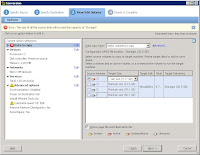
6. Click Finish to start conversion process.

8.You can see the status in progress marked in red

8.And the completed

9.Exit VMWare vCenter Converter once the conversion process is completed. Go to you ESX sever and start the converted VM.
I. Download VMware vCenter converter Standalone client and install in your physical sysem.
II. Convert Windows Physical system to Virtual (P2V).
Download VMware vCenter converter and install on physical system and install it on your physical system
Download VMware vCenter Converter Standalone client from below link. http://www.vmware.com/products/converter/
Note:We need to register to download vCenter converter. Just register with your mail id, it is free to download.
Convert Windows Physical system to Virtual (P2V).
1. Open VMware vCenter Converter and Click on Convert Machine

2. Select Source type is “Powered-on machine” and “This local machine” then click on Next

3. Select Destination type “VMware Infrastructure virtual machine” and give ESX server details at “VMware Infrastructure server details” and clink next


4. Give Virtual Machine name and click Next

5. Under View/Edit Option select drive to convert and check the box of drive which you want to convert and un-check the box if you do not want to convert them. Click on Next to continue.

6. Click Finish to start conversion process.

8.You can see the status in progress marked in red

8.And the completed

9.Exit VMWare vCenter Converter once the conversion process is completed. Go to you ESX sever and start the converted VM.
How to check start, restart or shutdown time of Windows Operating System
How to check start, restart or shutdown time of Windows Operating System. I found 2 ways to check start,restart or shutdown time of windows operating system.
1. Open command prompt and type below command and press enter. It will show up time of Windows OS.
C:\Documents and Settings\abc> systeminfo
2.We can check in Event Viewer.Open event viewer and go to System Events. Find
System Event ID:1074
The process C:\Windows\system32\shutdown.exe (WIN-6FP1VCCPJ0T) has initiated the restart of computer WIN-6FP1VCCPJ0T on behalf of user PR\Administrator for the following reason: No title for this reason could be found
Reason Code: 0x800000ff
Shutdown Type: restart
Comment:
System Event ID:109
The kernel power manager has initiated a shutdown transition.
Also check many services are stopped at a particular time.
System Event ID :6005 (This event id means the System went down at that time)
System Event ID :6006 (This event id means the System started at that time)
1. Open command prompt and type below command and press enter. It will show up time of Windows OS.
C:\Documents and Settings\abc> systeminfo
2.We can check in Event Viewer.Open event viewer and go to System Events. Find
System Event ID:1074
The process C:\Windows\system32\shutdown.exe (WIN-6FP1VCCPJ0T) has initiated the restart of computer WIN-6FP1VCCPJ0T on behalf of user PR\Administrator for the following reason: No title for this reason could be found
Reason Code: 0x800000ff
Shutdown Type: restart
Comment:
System Event ID:109
The kernel power manager has initiated a shutdown transition.
Also check many services are stopped at a particular time.
System Event ID :6005 (This event id means the System went down at that time)
System Event ID :6006 (This event id means the System started at that time)
netcat to transfer files between linux and windows
netcat in windows On Source PC(Windows) download and copy nc.exe netcat works as a Server and Client model.
Below steps show how to copy data from a Windows system into Linux(Ubuntu) system.Currently I am using Ubuntu Server.Varify
Windows System IP :192.168.xxx.xx and Linxu(Ubuntu) system IP: 192.168.yyy.yy
Copy files from Windows To Linux
Setp1:Download netcat into Windows System and copy nc.exe into the directory where your file is exist.
Ex: C:\test\nc.exe
Step 2:Install netcat on ubuntu
#apt-get install netcat
Step 3: Now netcat is available on both Windows and Linxu(Ubuntu)
Open command prompt and go to the directory where your file is located and run below command.This will act as a Server.
C:\test> type backup.iso | nc.exe -l -p 3333
Note: "type" is a command in windows.
Step 4: Receive backup.iso on the client machineLinux(Ubuntu) with the following.This will act as a Client
# nc 192.168.xxx.xx 3333 > backup.iso
Issue a ^C on the source system and your done one u see file size in destination directory. Be sure to check the file to be sure it is the same size as the original.
Copy files from Linxu to Windows
On Linxu system run below command. Now this will act as a Server
#cat backup.iso | nc -l -p 3333
On Windows Run below command. Now this will act as a Client.
C:\test> nc.exe 192.168.yyy.yy 3333 > backup.iso
Issue a ^C on the source system and your done one u see file size in destination directory. Be sure to check the file to be sure it is the same size as the original.
Subscribe to:
Posts (Atom)